Evaluating and Comparing Deep Models
You can measure the regression and classification performance of trained deep models with Dragonfly’s Model Evaluation tool. You should note that the evaluation metrics differ for regression (see Metrics for Regression Models) and semantic segmentation models (see Metrics for Semantic Segmentation Models) and are capable of discriminating among model results.
Choose Artificial Intelligence > Deep Learning Model Evaluation Tool on the menu bar to open the Model Evaluation dialog, shown below.
Model Evaluation dialog
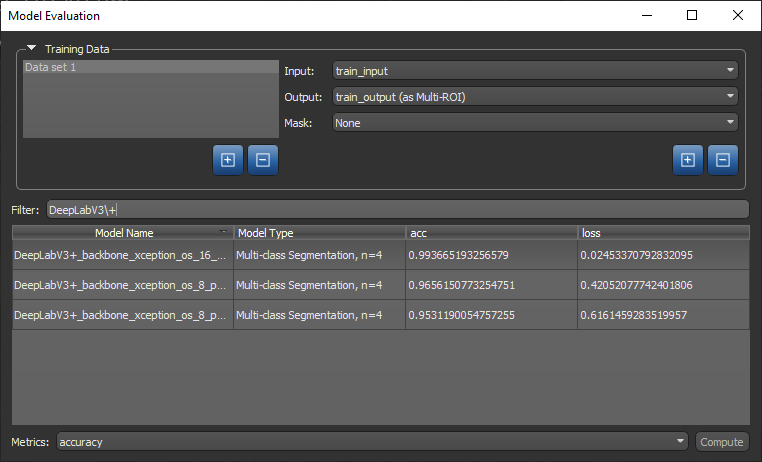
- Load the training set(s) that will provide the input(s) and output(s) for the evaluation, as well as any mask(s) that you intend to apply.
- Choose Artificial Intelligence > Deep Learning Model Evaluation Tool on the menu bar.
The Model Evaluation dialog appears.
- Choose the required input in the Input drop-down menu.
Note If your model(s) was trained with multiple inputs, click the '+' button and then add the required additional input(s) in the Input drop-own menu.
- Choose the required output in the Output drop-down menu.
All saved models that match the input and output criteria appear in the dialog. If required, you can filter the list by entering text in the Filter edit box.
- Choose a mask in the Mask drop-down menu, optional.
- Select the model(s) that you want to evaluate.
- Choose the required metric(s) in the Metrics drop-down menu.
Note Refer Metrics for Regression Models and Metrics for Semantic Segmentation Models for information about the available evaluation metrics regression and classification models.
- Click the Compute button.
